Frontend engineering done well is invisible to users and undervalued in reviews. The engineers who ship accessible, performant, reusable components are doing the same intellectual work as backend architects — the output just looks like a button.
How to Write Effective Frontend Engineer Performance Reviews
Frontend reviews have a persistent quality trap. Because the work is visible — you can literally open a browser and look at it — reviews often collapse into aesthetic judgments: “pixel-perfect,” “good eye for detail,” “designs look right.” These phrases are almost useless from a performance management perspective. They don’t differentiate a senior engineer from a junior one, they don’t capture technical depth, and they fail entirely to evaluate what matters: performance, accessibility, component reusability, and cross-functional collaboration quality.
The starting point for stronger frontend reviews is performance and Core Web Vitals. Lighthouse scores, Largest Contentful Paint, Cumulative Layout Shift, and bundle size are objective, measurable, and directly tied to user experience and SEO. An engineer who consistently ships features that improve or maintain these scores is doing something fundamentally different from one who ships features without measuring them. These numbers belong in performance reviews.
Component architecture is frequently the highest-leverage dimension for senior frontend engineers, and it’s rarely discussed explicitly in reviews. An engineer who builds a Storybook-documented, composable component system that 6 feature teams reuse is creating a compounding return on investment — every component they build well saves time for every consumer, for every sprint going forward. Review language needs to name this leverage explicitly rather than treating component work as undifferentiated “feature work.”
Accessibility is both a legal obligation and a quality signal, and it’s systematically under-evaluated in frontend reviews. Engineers who integrate Playwright accessibility checks into the CI pipeline, audit keyboard navigation, and write screen reader-compatible markup are doing work that protects the organization from compliance risk and extends the product to users with disabilities. This work deserves explicit recognition in reviews, not quiet assumption that it happens as part of “doing the job.”
How to Use These Phrases
For Managers
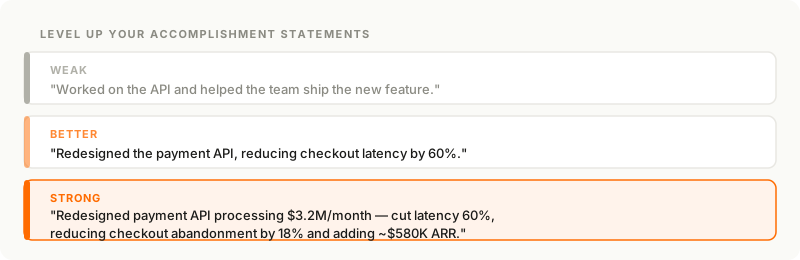
Frontend review language is most effective when it connects behavior to the metric or user outcome it produced. “Optimized performance” is weak. “Reduced LCP from 3.8 seconds to 1.4 seconds, improving mobile conversion by 12%” is strong. These phrases give you the structure; add the numbers from your team’s Lighthouse reports, analytics dashboards, and sprint retrospectives.
For Employees
Use these phrases as a vocabulary guide for your self-assessment. The “Exceeds” phrases show you what reviewers and promotion committees look for: specificity, impact, and evidence of leverage beyond your own code. If you’re close to a promotion conversation, look at which “Exceeds” phrases describe work you’ve done but haven’t documented — those are your gaps to fill in.
Rating Level Guide
| Rating | What it means for Frontend Engineers |
|---|---|
| Exceeds Expectations | Proactively improves performance, accessibility, and component reuse across the product; drives cross-functional collaboration with design; raises team-wide quality standards through tooling and documentation |
| Meets Expectations | Delivers features that are functional, accessible, and performant within team standards; writes reusable components; collaborates effectively with design and product |
| Needs Development | Delivers working UI but requires guidance on performance optimization, accessibility requirements, or component design; output often needs rework before meeting production standards |
Feature Delivery & Quality
Exceeds Expectations
- Consistently ships features that are production-ready on first deployment — with Playwright test coverage, error boundary handling, and loading state design included — reducing the post-release bug rate from this engineer's work to near zero.
- Proactively identifies ambiguous requirements during sprint planning and resolves them with design and product before development begins, eliminating the late-stage scope changes that have cost other engineers significant rework time.
- Independently built the end-to-end Playwright test suite for the checkout flow, catching three regression bugs in CI before they reached staging and establishing a test pattern the team has adopted for all critical paths.
- Drives a definition of "done" that includes cross-browser testing, responsive behavior, and edge case handling — and holds this standard in code review for the whole team.
- Delivered the redesigned onboarding flow three days ahead of schedule by identifying a reusable pattern in the existing component library that eliminated two weeks of estimated implementation work.
Meets Expectations
- Delivers assigned features on schedule with functional implementations that meet the design spec and pass manual QA without significant defects.
- Writes Playwright or equivalent end-to-end tests for critical user flows, maintaining test coverage at or above team thresholds.
- Handles loading states, error states, and empty states in UI components, providing a complete user experience rather than just the happy path.
- Tests work across the agreed browser matrix and at mobile, tablet, and desktop breakpoints before marking tasks complete.
- Participates in sprint planning with realistic estimates that account for design feedback loops, cross-browser testing, and accessibility requirements.
Needs Development
- Would benefit from more thorough pre-implementation review of requirements to catch ambiguity earlier — several recent features required significant rework after design review revealed misalignments that could have been caught during planning.
- Is developing stronger habits around edge case handling; recent features have shipped without error states or empty state designs, requiring follow-up work after initial delivery.
- Has shown progress in delivery speed but would benefit from adding Playwright test coverage earlier in the development cycle to reduce the regression risk that has affected recent releases from this engineer's work.
Performance & Core Web Vitals
Exceeds Expectations
- Proactively audited the product's Lighthouse scores across all major routes and identified a JavaScript bundle splitting opportunity that reduced the initial load bundle size by 40% and improved LCP by 1.2 seconds on mobile.
- Independently implemented React.lazy and Suspense boundaries throughout the application, reducing Time to Interactive on the dashboard from 4.1 seconds to 2.3 seconds without changing visible functionality.
- Consistently monitors Core Web Vitals in production using DataDog RUM and has resolved three LCP regressions before they compounded into user-visible performance degradation.
- Drives performance budgets as a team standard, integrating Lighthouse CI into the GitHub Actions pipeline to block PRs that regress key metrics below agreed thresholds.
- Led the image optimization initiative — converting to WebP with responsive srcset, implementing lazy loading, and adding blur-up placeholders — reducing median page weight by 55% for image-heavy product pages.
Meets Expectations
- Implements code splitting for new routes and heavy dependencies, keeping the initial bundle size within team-defined thresholds.
- Uses appropriate memoization — React.memo, useMemo, useCallback — where profiling justifies it, without over-optimizing components that don't have measurable performance issues.
- Monitors Lighthouse scores for features in their ownership area and addresses regressions when flagged in CI.
- Optimizes images and static assets according to team standards — appropriate formats, sizes, and lazy loading — before shipping features that include media.
Needs Development
- Would benefit from a stronger focus on performance measurement as part of the definition of done — several recent features have shipped with LCP regressions that were only caught in post-release monitoring.
- Is developing a more systematic approach to bundle size management; recent additions have introduced large third-party dependencies without evaluating lightweight alternatives or code-splitting the import.
- Has shown progress in writing functional features but would benefit from learning to use browser DevTools performance profiling to identify and resolve rendering bottlenecks more independently.
Component Architecture
Exceeds Expectations
- Proactively designed and documented a composable form component system in Storybook that has been adopted by all five feature teams, eliminating duplicated form logic and reducing the average time to build a new form from two days to four hours.
- Independently established the TypeScript prop interface conventions for the shared component library, catching type mismatches at compile time and reducing the runtime prop errors that had previously surfaced in QA.
- Consistently builds components that are headless and composable by default, separating logic from presentation in a way that enables design iteration without requiring engineering rework.
- Drives component review sessions that evaluate reuse potential before new UI work is implemented, preventing parallel development of duplicate components across feature teams.
- Authored the component design guide — naming conventions, prop interface patterns, accessibility requirements, Storybook documentation standards — that has become the team's authoritative reference for component development.
Meets Expectations
- Builds reusable components with well-typed TypeScript interfaces that are documented in Storybook with representative usage examples.
- Checks the existing component library before building new UI elements, reusing shared components where they meet requirements rather than creating one-off implementations.
- Designs component APIs that are appropriate for their consumers — not over-engineered for hypothetical future use cases, but flexible enough to handle real variation in usage.
- Separates container (data-fetching) and presentational components appropriately, enabling independent testing and reuse of the presentational layer.
Needs Development
- Is developing a more systematic approach to component design; several recent implementations have been tightly coupled to specific page contexts, limiting their reuse and requiring additional work when similar UI is needed elsewhere.
- Would benefit from deeper engagement with Storybook and the shared component library — several recent features have duplicated components that already existed, adding maintenance burden to the codebase.
- Has shown progress in building functional UI but would benefit from more attention to TypeScript prop interface design, particularly around optional props and discriminated union types that better capture component variant logic.
Accessibility & Standards
Exceeds Expectations
- Proactively integrated axe-core accessibility checks into the Playwright test suite, catching 14 WCAG violations in existing features and establishing an automated regression gate that prevents accessibility regressions from shipping.
- Independently audited the product's keyboard navigation paths and filed, prioritized, and resolved a backlog of 22 accessibility issues, bringing the product to WCAG 2.1 AA compliance for the first time.
- Consistently implements semantic HTML, ARIA roles, and focus management in new features, writing accessible UI by default rather than retrofitting accessibility as an afterthought.
- Leads accessibility code review with specific, actionable feedback — citing WCAG criteria, providing corrected code examples — elevating the accessibility standard across the team's output.
- Drove the adoption of a color contrast design token system in collaboration with the design team, ensuring new components meet WCAG AA contrast ratios by default without requiring per-component audits.
Meets Expectations
- Implements semantic HTML elements — nav, main, article, section, button, label — appropriately, providing a meaningful document structure for screen readers and keyboard users.
- Adds appropriate ARIA labels, roles, and live regions to interactive components and dynamic content areas.
- Ensures keyboard navigability of new UI elements, including visible focus indicators and logical tab order.
- Tests features with a screen reader (VoiceOver or NVDA) before marking accessibility work complete.
Needs Development
- Is developing stronger accessibility habits; recent components have used div and span where semantic HTML elements were appropriate, and several interactive elements lack keyboard support.
- Would benefit from a structured review of WCAG 2.1 AA criteria and hands-on screen reader testing to build the instinct for accessible component design that currently requires external review to achieve.
- Has shown genuine willingness to address accessibility feedback but is still building the foundational knowledge needed to write accessible UI without relying on post-implementation audits to catch issues.
Design Collaboration
Exceeds Expectations
- Proactively identifies implementation concerns during design review — animation performance on low-end devices, responsive behavior at edge breakpoints, component reuse opportunities — before Figma files are handed off, reducing mid-implementation design pivots.
- Consistently provides design teams with clear technical constraints — what is feasible in CSS vs. what requires JavaScript, where animation will hurt performance, which Figma components map to which React components — enabling better design decisions upstream.
- Independently bridged the gap between design tokens in Figma and CSS custom properties in the codebase, creating a single source of truth that has eliminated the recurring color and spacing drift between design specs and shipped product.
- Drives design system parity initiatives, identifying divergence between the Figma component library and the Storybook implementation and coordinating the work to bring them back into alignment.
- Participates in design critiques as a technical voice, providing input on motion design feasibility, touch target sizing, and responsive behavior that improves design quality before implementation begins.
Meets Expectations
- Implements designs accurately and raises implementation questions through the agreed channel before deviating from the Figma spec.
- Communicates design gaps — missing states, ambiguous spacing, undefined responsive behavior — back to design with clear screenshots and questions rather than making unilateral decisions.
- Participates in design handoff reviews, reviewing Figma files for implementation completeness before beginning development work.
- Provides feedback on design feasibility when asked, citing specific technical constraints rather than general objections.
Needs Development
- Would benefit from more proactive engagement with design during the handoff phase — several recent implementations deviated from the spec in ways that required redesign cycles that could have been avoided with an earlier technical review conversation.
- Is developing the communication habits needed to flag design ambiguity before it becomes a mid-sprint blocker; the pattern of discovering missing states during implementation has been a consistent source of scope creep.
- Has shown progress in implementing designs accurately but would benefit from investing in the cross-functional relationship with design to build the shared vocabulary that makes collaboration faster and reduces rework.
How Prov Helps Build the Evidence Behind Every Review
Frontend engineers often have the most visible output on the team and the least-documented impact. Lighthouse scores improve, accessibility issues get resolved, component libraries reduce other teams’ delivery time by days — and none of it gets written down. At review time, the engineer remembers the work but can’t produce specifics, and the manager has to reconstruct the impact from memory.
Prov gives frontend engineers a place to capture impact as it happens — a 30-second note after a Core Web Vitals win, a voice memo after a design collaboration session that prevented a week of rework, a quick capture when a component you built gets adopted by a second team. Those notes accumulate into a record with extracted skills and patterns. When review season arrives, you have the evidence to match the phrases — specific, dated, and hard to undersell.
Ready to Track Your Wins?
Free to start, no account, no sign-up. Available on the App Store now.
Download on iOS Free to start, no account needed